
Maintenance
How-to guideHow to Program an 893max liftmaster 3 button remote
August 27, 2026 · Prime Garage Doors
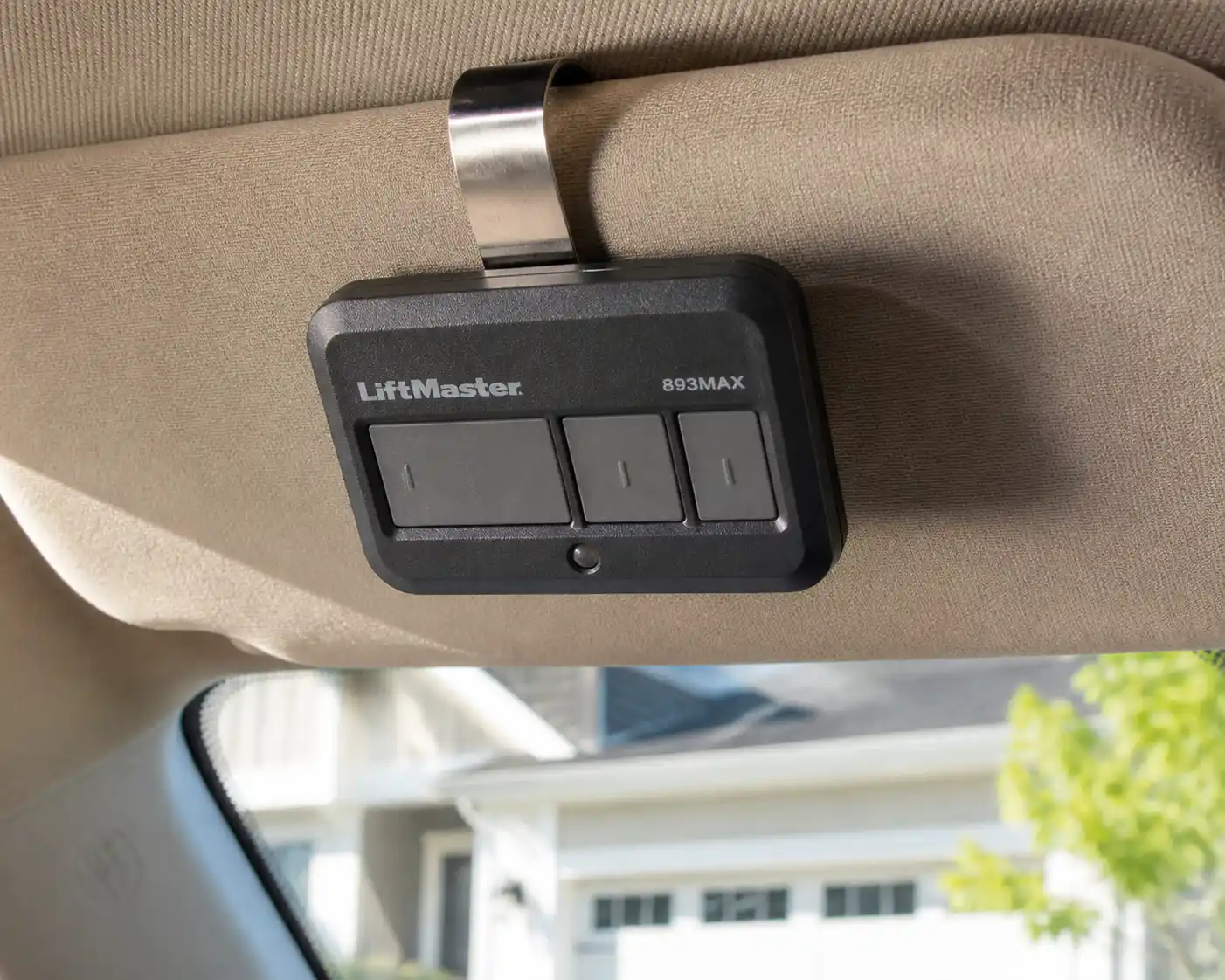
Looking for an easy way to program your LiftMaster 893MAX 3-button remote? Follow our step-by-step troubleshooting guide to pair your transmitter with any compatible garage door opener.
Programming an 893MAX LiftMaster 3 button remote requires configuring the transmitter's internal radio frequency to match your specific opener and syncing it with the motor unit's Learn button. By selecting the correct signal format, a single 893MAX transmitter can operate up to three independent automatic garage door openers or gate operators manufactured since 1993. Homeowners across Greater Boston can set up their multi-button remote in just a few straightforward steps after confirming opener hardware compatibility.
Understanding the 893MAX LiftMaster 3 Button Remote and Opener Frequencies
The 893MAX LiftMaster 3 button remote is a versatile, multi-frequency transmitter engineered to work across multiple generations of automated overhead door hardware. Powered by dual-frequency MAX radio technology broadcasting on both 315 MHz and 390 MHz, this remote communicates with LiftMaster, Chamberlain, and Craftsman openers installed over the last several decades. Similar in functionality to compact visor and keychain transmitters like the LiftMaster 890MAX, the 893MAX allows you to consolidate control of up to three separate overhead doors or residential gate operators into a single device.
To program the remote successfully, you must match the signal output of your chosen remote button to the specific receiver technology built into your garage door opener head. Overhead door manufacturers have updated their logic board radio receivers over time to improve security and prevent signal interception. The color of the smart Learn button located on your opener's motor casing indicates the exact radio technology your system uses:
- Yellow Learn Button: Operates on Security+ 2.0 tri-band radio technology (315 MHz, 390 MHz, and 900 MHz). Found on modern openers manufactured from 2011 to the present.
- Purple Learn Button: Operates on Security+ 315 MHz single-frequency radio technology. Common on openers manufactured between 2005 and 2014.
- Red or Orange Learn Button: Operates on Security+ 390 MHz rolling code technology. Standard on units manufactured between 1997 and 2005.
- Green Learn Button: Operates on Billion Code 390 MHz fixed code radio technology. Found on earlier automated openers manufactured between 1993 and 1997.
Identifying your Learn button color before starting ensures that the transmitter sends the correct code profile to the logic board. Environmental factors typical to New England homes—such as sudden winter temperature drops, seasonal freeze-thaw cycles, and summer humidity—can drain coin-cell batteries quickly and reduce transmitter range. Installing a fresh battery and clearing direct access to the overhead motor unit establishes a smooth setup process.
Initial Checks, Required Tools, and Overhead Door Safety
Before beginning the programming sequence, inspect your overhead door workspace and assemble the essential tools. Having clear visibility and proper equipment ensures you can program the remote efficiently while maintaining absolute home safety.
Verify that the working light bulbs in your motor unit housing are operational. Overhead motor units rely on their built-in work lights to flash, signaling when a new transmitter frequency has been successfully recognized and saved. Gather the following items before climbing toward the motor head:
- An 893MAX LiftMaster 3 button remote fitted with a fresh CR2032 lithium coin-cell battery.
- A sturdy, properly leveled step ladder placed directly beside the motor unit casing.
- The metal visor clip included with the remote, or a standard paperclip or small pin.
- A clear, unobstructed garage workspace with all vehicles, tools, and bystanders moved away from the door opening.
Safety Note: Automated garage door assemblies operate under extreme structural and mechanical forces. The U.S. Consumer Product Safety Commission (CPSC) warns that high-tension hardware—including torsion springs, extension springs, lifting cables, bottom brackets, and winding cones—carries extreme stored energy capable of causing severe physical injury. Never attempt to adjust, loosen, or touch high-tension hardware, lifting cables, or spring assemblies while programming remotes or inspecting your opener system. Keep children and pets completely clear of the travel area, as the door may cycle automatically during testing.
Step-by-Step Guide: How to Program Your 893MAX LiftMaster 3 Button Remote
Follow these sequential steps to configure your 893MAX LiftMaster 3 button remote transmitter to operate your overhead door opener safely and accurately.
Step 1: Access the Hidden Program Button
Detach the metal visor clip from the rear mounting slot of the 893MAX remote transmitter. Examine the back casing of the remote near the battery compartment to locate the small, recessed program pinhole. Insert the straight end of your visor clip, a paperclip, or a small pin into this pinhole to engage the internal setup switch.
Step 2: Enter Active Remote Programming Mode
Press and hold the internal program button using your pin tool until the LED indicator light on the front face of the remote illuminates solid. Once the front LED light glows continuously without blinking, release the button. The remote is now in active programming mode and ready to assign a radio frequency profile to your selected transmitter button.
Step 3: Set the Signal Frequency for Your Specific Opener
Select which of the three large buttons on the front of the remote you wish to use for operating your garage door opener. Press your selected button a specific number of times based on the color of the Learn button on your garage door opener motor head:
- Press the button 1 time if your opener features a Yellow Learn button.
- Press the button 2 times if your opener features a Purple Learn button.
- Press the button 3 times if your opener features a Red or Orange Learn button.
- Press the button 4 times if your opener features a Green Learn button.
Pause briefly between each press. Confirm that the LED light on the remote flashes with every press to verify the unit registered your input.
Step 4: Lock In the Frequency Selection
Once you have pressed your chosen button the required number of times, press any other button on the front of the remote exactly once. Do not press the button you are currently configuring. Pressing a different button locks the selected frequency code into the memory of the assigned button and exits the remote's setup mode. The front LED light will turn off completely.
Step 5: Press the Learn Button on the Motor Head
Safely ascend your stepladder to access the overhead garage door opener. Locate the colored, square or round Learn button on the rear or side control panel of the motor unit. On many models, this control panel is protected behind a hinged plastic light lens. Press and immediately release the Learn button once. Do not hold the Learn button down; holding it for longer than six seconds will erase all stored remotes, keypads, and smart accessories from your logic board memory. The diagnostic indicator light adjacent to the Learn button will glow steadily for 30 seconds, indicating the receiver is ready to accept a new signal.
Step 6: Sync the Remote Transmitter to the Receiver
Within 30 seconds of releasing the opener's Learn button, press and hold the designated button on your 893MAX remote. Continue holding the button down until the light bulbs on the motor unit flash twice, or until you hear two distinct click sounds from the internal relays within the motor housing. This light flash or click confirms that the logic board has recognized and saved your remote's unique radio code.
Step 7: Conduct an Operational Safety Test
Step down from your ladder, move it away from the moving hardware, and step back to a safe position inside or outside the garage. Press the newly programmed remote button once to test communication. The overhead door should activate and travel smoothly along its track system. Press the remote button again to stop or reverse the door, confirming that the programming procedure is complete.
Ongoing Maintenance and Signal Troubleshooting
Maintaining long-term remote performance involves simple preventative care and periodic component checks. Environmental conditions in the Greater Boston area can cause standard lithium batteries to lose voltage rapidly during cold winter months. Replacing the CR2032 coin-cell battery every 12 to 24 months prevents unexpected drops in signal range or erratic remote responsiveness.
If your newly programmed remote operates only when standing right next to the overhead motor, signal interference may be blocking the transmission. Common household LED light bulbs installed inside the opener light sockets often radiate electromagnetic noise that jumbles radio signals. If you suspect signal degradation, replace standard household LED bulbs with opener-compatible LED bulbs designed specifically to eliminate radio frequency interference.
In addition to electrical care, maintaining smooth mechanical movement reduces strain on your opener motor, preserving receiver responsiveness for quick garage door repair prevention:
- Inspect the glass lenses of the safety reversal sensors near the base of the door rails and wipe away dust, dirt, or spiderwebs.
- Inspect the steel physical channels of the garage door track system to ensure they remain clean and clear of gravel or solid debris.
- Apply dedicated garage door lubricant strictly to moving steel bearings, roller stems, and hinge pivot points—never apply grease, oil, or spray lubricant inside the garage door track system.
Keeping track channels clean without applying grease inside the garage door track system prevents dirt from collecting into a grinding paste that can jam rollers and stall your opener motor.
When to Call a Professional Garage Door Service
While remote setup is generally simple, internal electrical issues or mechanical binding can disrupt the syncing process. If your opener Learn button fails to illuminate when pressed, if the motor housing diagnostic light flashes continuous error codes, or if your garage door won't open even though the motor runs, professional garage door opener repair is necessary.
Never force an automated system to operate if you hear loud grinding noises or if the door sits unevenly. Physical damage like frayed lifting cables, worn motor drive gears, or snapped torsion springs places immense stress on the opener head. Running an unbalanced or jammed door using a newly programmed remote can burn out the logic board or strip internal drive gears.
When physical door issues or electrical errors occur, rely on experienced professionals who understand complex residential overhead door mechanics. Prime Garage Doors serves homeowners across Greater Boston, including Watertown, Boston, Cambridge, Somerville, Newton, Quincy, Brookline, Waltham, Medford, Malden, Arlington, and Belmont. Our experienced garage door professionals rapidly diagnose motor glitches, align off-track hardware, replace high-tension springs, and restore reliable automatic operation.
If your remote fails to sync or your overhead door operates erratically, contact our team for assistance. Request a Free Estimate or Call Now to schedule service with our experienced technicians.
Summary of 893MAX Remote Setup
Programming an 893MAX LiftMaster 3 button remote requires matching the remote frequency to your opener's Learn button color, locking in the setting, and syncing the transmitter directly to the overhead motor head. Following proper step sequences ensures smooth operation across multiple overhead doors while protecting your opener hardware.
- Match the number of remote button presses to the specific Learn button color on your opener motor housing.
- Use the recessed rear program pinhole to enter active setup mode before configuring frequency profiles.
- Lock in your signal selection by pressing a different button on the remote before pressing the opener Learn button.
- Keep high-tension hardware untouched and clear all objects from the door opening during testing.
- Avoid spraying grease inside the garage door track system to ensure smooth physical movement.
If you encounter persistent programming issues, logic board errors, or mechanical door jams across Greater Boston, our experienced technicians are ready to assist with free estimates, 24/7 phone support, and same-day service availability. Request a Free Estimate or Call Now at (844) 321-0914 to speak with the team at Prime Garage Doors today.
Frequently asked
- How do I find the Learn button color on my garage door opener?
- You can locate the Learn button on the rear panel or under the light lens of your ceiling-mounted opener powerhead. Look for a small colored button—typically yellow, purple, red, orange, or green—next to an indicator LED light. The color determines how many times you must tap your remote button during the programming process.
- Why won't my LiftMaster 893MAX remote pair with my opener?
- Unsuccessful pairing usually happens if the remote battery is low, the opener memory is full, or the wrong number of button presses was entered for your Learn button color. Make sure to press and immediately release the Learn button on the motor head rather than holding it down. If your remote remains unresponsive, our experienced professionals offer same-day service available throughout Greater Boston.
- Can I use one LiftMaster 893MAX remote for multiple garage doors?
- Yes, the LiftMaster 893MAX remote features three independent buttons that can control up to three distinct garage door openers or MyQ light accessories. You can program each button separately using the exact Learn button color code for each opener head. This allows you to manage different doors on a single remote, even if the openers are different ages.
- What happens if I hold down the Learn button on my garage door opener too long?
- Holding the Learn button down for six to eight seconds erases all stored remote controls, keypads, and smart home connections from the motor's memory. If you accidentally clear the memory, you will need to perform the pairing steps again for every handheld remote and keypad operating that door. If you need help reprogramming your system, Request a Free Estimate or call our team for assistance.
- Does cold New England winter weather affect my garage door remote?
- Freezing winter temperatures across Greater Boston can drain the CR2032 coin cell battery inside your remote faster than usual, causing range reduction or erratic behavior. If your remote stops working on a cold day, try replacing the battery and ensure snow or frost is not blocking the safety sensors near the floor. For persistent opener problems, Call Now to speak with our 24/7 phone support team.